Factory reset


msssm

Members
18 Sep 2021
109
30
Hello, On Mi 11 Ultra (star) I had HyperOS 1 and just installed the recent xiaomi.eu_STAR_OS2.0.7.0.UKACNXM_14.zip and wanted to to a factory reset. Then I did a wipe in TWRP, but I realised after restart, my settings have not been wiped.
Then I did a factory reset from the system.
Now I can just boot into TWRP or Fastboot. I can't flash the system anymore because TWRP does not react after started, but I can do adb shell. Then I don't see the /sdcard being mounted to have a place for the 5.2G ZIP file. I like to install it from TWRP. What can I do?
 
 
Last edited:
So I need to flash the Official Hyper OS Rom first, and then the Xiaomi EU version after?
 
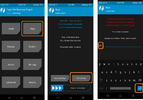
If you want to do a "factory reset" you have to do "Format Data" in TWRP, not wipe. You can try it now and maybe the system will boot.
 

Attachments

  • Format_Data.png
    Format_Data.png
    79.3 KB · Views: 118
If you want to do a "factory reset" you have to do "Format Data" in TWRP, not wipe. You can try it now and maybe the system will boot.
I can't because TWRP does not react after started, only adb shell works.
 
xiaomi.eu_STAR_OS2.0.7.0.UKACNXM_14.zip
If you want to install the xiaomi.eu ROM, you can install it via fastboot even with Linux. Use the script with "format Data".

Installing with Fastboot:
  • Download Xiaomi.eu ROM zip file
  • Extract the ROM zip to a new folder
  • Power off your device
  • Boot your device in Fastboot mode (Hold volume down + power buttons)
  • Connect to PC via USB cable
  • Run one of the installation scripts (according to your PC operating system):
    - install_and_format_data - with data wipe, if you're flashing Xiaomi.eu ROM for the first time or downgrading.
 
  • Like
Reactions: msssm
Run one of the installation scripts (according to your PC operating system):
- install_and_format_data - with data wipe, if you're flashing Xiaomi.eu ROM for the first time or downgrading.
That perfectly worked on that device.
Now I have another device, also Mi 11 Ultra (star). Here I get this failure and the process is freezing there:
Code:
./linux_install_and_format_data.sh
Waiting for device...
Your device: star
Your device will be flashed and the data partition will be formatted.
You will lose your apps, settings and files on internal storage.
Continue if you are flashing Xiaomi.eu ROM for the first time or downgrading.
Do you want to continue? [y/N] y
##############################################################
Please wait. The device will reboot once flashing is complete.
##############################################################
fastboot: error: Device does not support slots
Warning: skip copying abl_ab image avb footer (abl_ab partition size: 0, abl_ab image size: 208896).
Sending 'abl_ab' (204 KB)
How can proceed with this device?
 
The issue is always the same. I need to reboot again into fastboot, while the script is waiting for a device, then it resumes and finishes the task. I tried again, and it's the same, replugging while in fastboot does not work, only reboot again into fastboot while staying connected.
Ok, solved for me for now...