New method to hide the root


Sorry to bother you, do you have a solution to make Chatgpt work? It doesn't on my rooted device.
Thanks
follow this post
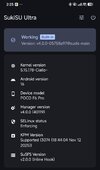
ok so, first look for supported version of your kernel from the release page download the latest Manager, flash the kernel reboot install the Manager ( if need reboot ) install the modules Rezygisk , PlayIntegrityFix-inject , TrickyStore , Tricky-Addon , VBMeta-Fixer , BootloopProtector , LSPosed , zygisk-detach reboot after that open tricky-store select all and save. generate new pif file in play-integrityfix-inject, if you have valid keybox replase it and you are done. all gonna work like must be.
 
I already disable the developer mode, and i restart the phone , it detected again
i gonna give you another solution then install Hide-Debugging and your app gonna work, but be careful if you use IAmNotADeveloper gonna have conflict between so you must choose if you dont have another aplication only this one you must use Hide-Debugging if you have another aplication so... what can i say :)
 
i gonna give you another solution then install Hide-Debugging and your app gonna work, but be careful if you use IAmNotADeveloper gonna have conflict between so you must choose if you dont have another aplication only this one you must use Hide-Debugging if you have another aplication so... what can i say :)
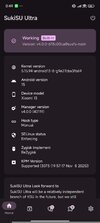
Maybe i discover the problem?? The susfs is missing , how can i get it back
 

Attachments

  • Screenshot_2025-11-17-00-49-35-020_com.sukisu.ultra.jpg
    Screenshot_2025-11-17-00-49-35-020_com.sukisu.ultra.jpg
    330.2 KB · Views: 625
Maybe i discover the problem?? The susfs is missing , how can i get it back
its not susfs just install the latest kernel and install the latest manager SukiSU-Ultra is build with SusFS integrated so yu dont need a modul. Your problem is the app detect developer option wich i give you the module to flash and you are good to go if you dont use GCash also have another solution but a little bit later i gonna say ;)
 
its not susfs just install the latest kernel and install the latest manager SukiSU-Ultra is build with SusFS integrated so you dont need a modul. Your problem is the app detect developer option wich i give you the module to flash and you are good to go if you dont use GCash also have another solution but a little bit later i gonna say ;)
 
After upgrading my Xiaomi 15 (Dada) to HyperOS 3.05 it doesn´t work for me anymore. I could patch the init_boot with SukiSu Ultra and flash it without any problems. However, after flashing the latest kernel (6.6.66) in TWRP I got bootloop. Tried another kernel (6.6.50) but got also bootloop. I tried also flashing both kernels in SukiSu Ultra but I still got bootloop.

So is this method not working anymore for HyperOS 3.05 anymore or what I´m doing wrong?

I already used this method successfully with the last HyperOS 2.0 release without any problems.
 
After upgrading my Xiaomi 15 (Dada) to HyperOS 3.05 it doesn´t work for me anymore. I could patch the init_boot with SukiSu Ultra and flash it without any problems. However, after flashing the latest kernel (6.6.66) in TWRP I got bootloop. Tried another kernel (6.6.50) but got also bootloop. I tried also flashing both kernels in SukiSu Ultra but I still got bootloop.

So is this method not working anymore for HyperOS 3.05 anymore or what I´m doing wrong?

I already used this method successfully with the last HyperOS 2.0 release without any problems.
Who told you to flash in TWRP ? you must flash directly the release of the kernel via fastboot search for your kernel finished with boot.img and flash it via fastboot and install the latest manager or beta. done
 
Who told you to flash in TWRP ? you must flash directly the release of the kernel via fastboot search for your kernel finished with boot.img and flash it via fastboot and install the latest manager or beta. done
I was just following your instruction from page 1:

1763446147334.png


Anyway, I assume the correct procedure is now:
1. patch init_boot with SukiSu Ultra
2. flash patched init.boot in fastboot
3. stay in fastboot and flash kernel with command "fastboot flash boot_ab"
4. Reboot to HyperOS and flash latest version of the manager
Corrcect? Please confirm.
 
I was just following your instruction from page 1:

View attachment 56555

Anyway, I assume the correct procedure is now:
1. patch init_boot with SukiSu Ultra
2. flash patched init.boot in fastboot
3. stay in fastboot and flash kernel with command "fastboot flash boot_ab"
4. Reboot to HyperOS and flash latest version of the manager
Corrcect? Please confirm.
yes is correct but this is old post so you can just download the boot.img file and flash it directly via fastboot no need to patch the init file if the kernel release have boot.img file. so i need to edit the post then when i have time. to much stuff they change.
 
  • Like
Reactions: graucher
Tried to flash all available A15 boot.img kernels (6.6.50, 6.6.66, 6.6.102) via fastboot but it always rebooted into fastboot after flashing.
So still not working. Any ideas @Tears Burn ?
 
look for you supported version of the kernel if is there no have reason to not work if is not there try wit larger version if not work then SukiSU-Ultra is not for you try with KernelSU + WildKernel who now. I dont now what you do, how you do it and on and on, so just figure it out
 
Tried to flash all available A15 boot.img kernels (6.6.50, 6.6.66, 6.6.102) via fastboot but it always rebooted into fastboot after flashing.
So still not working. Any ideas @Tears Burn ?
You cannot update any kernel. What is version of orginal kernel
In my case, on Android 15+, HyperOs 2.0.9 i have Androind12 5.10.226 original Kernel. then I flash Wild Kernel with same version and everything works pefect
 
  • Like
Reactions: graucher
My orginal kernel is Android 15, 6.6.77.
As far as I know every Android 15, 6.6.xxx kernel shuld work.
In fact I, flashing kernels 6.6.50 and 6.6.66 resulted in bootloop to fastboot.
Flashing kernel 6.6.102 I could reboot but system is unstable and screen is flickering.
 
so you need wild kernel 6.6.77-andoroid15 and nothing less or upper. You can chose between Normal and Bypass. This will work
I rooted my device with KernelSU Next and no app detected root so far.

I didn´t flash a kernel because as far as I know the only benefit is that I can use the google wallet which is only a "nice to have" for me. Is this correct?

What other benefits does a custom kernel have?
 
My orginal kernel is Android 15, 6.6.77.
As far as I know every Android 15, 6.6.xxx kernel shuld work.
In fact I, flashing kernels 6.6.50 and 6.6.66 resulted in bootloop to fastboot.
Flashing kernel 6.6.102 I could reboot but system is unstable and screen is flickering.
Really, you didnt flash kernel. Kernelsu next is root by kernel mod
 
  • Like
Reactions: graucher
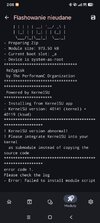
Hi I believe I followed it :)
I can not install rezygisk
 

Attachments

  • WhatsApp Image 2025-11-28 at 02.25.32.jpeg
    WhatsApp Image 2025-11-28 at 02.25.32.jpeg
    71.6 KB · Views: 557
  • WhatsApp Image 2025-11-28 at 02.21.30.jpeg
    WhatsApp Image 2025-11-28 at 02.21.30.jpeg
    89.6 KB · Views: 552
Really, you didnt flash kernel. Kernelsu next is root by kernel mod
Yes I know because every kernel flash ****ed up my system. Luckily I find out that it is not necessary for root only.
Therefore, I asked the stupid question about the benefits of a custom kernel.
However, you don´t want to answer because you don´t work in kindergarten. Thanks anyway, hava a nice weekend.
 
  • Haha
Reactions: Eclipse1991