


Nope, same result, doesn't workUse bindhost withnadway working
New method to hide the root
- Thread starter Tears Burn
- Start date
You are using an out of date browser. It may not display this or other websites correctly.
You should upgrade or use an alternative browser.
You should upgrade or use an alternative browser.
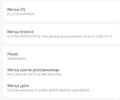
Please help! The picture shows the kernel from Xiaomi 13T. I don't know which one to choose. 5.10.236 won't connect to SukiSu, and 5.10.x-its won't connect either. Help!!!! Which kernel for Sukisu?This is for educational purposes only, I take no responsibility for any damage caused.2. Hide USB debugging and even developer options without injection traces detected
Hello guys, let's talk about again for how to hide root in proper way in 2025It's been a long time since Magisk was the only option for hiding root But times change. With each passing year, Google constantly creates obstacles and updates its requirements for the proper functioning of its applications as well as various banking applications and government applications. By defining Magisk fork as rooting solutions including Magisk, KSU, Apatch, and their branches, the development of bypassing can be briefly described as follows.
1. Magisk + Xposed (2018 and before)
2. Magisk + Edxposed (2019)
3. Magisk + Edxposed + Anti-blocking plugins (2020)
4. Magisk + LSPosed (2021)
5. Magisk Fork + LSPosed (2022)
6. Magisk Fork + LSPosed + Shamiko (2023)
7. Magisk Fork + LSPosed + Shamiko + PIF + TS (2024)
8. Magisk Fork + LSPosed + SUSFS/Shamiko/NoHello + PIF + TS + VBMeta Fixer + Cleaning up (2025)
Currently, even with the state-of-the-art bypassing techniques, the following problems still cannot be solved with appropriate solutions
1. Hide custom ROMs
3. Hide accessibility mode (even the affected application cannot detect accessibility mode) without injection traces detected
4. Solve the problem that WeChat fails to enable fingerprint payment while all other applications can use it normally
5. Solve the problem that the STRONG integrity check cannot be passed on devices with the bootloader unlocked when there is no valid keybox
6. Hide injection traces for applications injected at the application level
While following the tutorials, please also consider referring to the documentation and the Actions tab of the GitHub repositories for each rooting solution, module, and plugin, if there are.
Currently, SukiSU + ReZygisk + SUSFS is the optimal solution, follwed by Magisk Alpha + Zygisk Next + Shamiko, Apatch + Cherish Peekaboo + NoHello, and Magisk Delta. source
Yesterday I installed SukiSU - Ultra and I was amazed at how well it works, how much better it does compared to Magisk Alpha and how well it hides the root. At the time of writing this post, I can definitely say that this is the best method for hiding the root. ( I use poco f6 pro Vermeer ) So, you can read the source or continue reading here. How to install SukiSU - Ultra that's the questionFor more advanced users it will not be a problem but for inexperienced users it will be a bit complicated. So, I will try to explain in the most understandable way possible for novice users. Let`s Start the tutorial
Тhis method is based on kernel rooting
On this example we gonna install SukiSU-Ultra for our root manager. First of all go on SukiSU-Ultra release page and find your supported kernel and download the .img file. In this example i use poco f6 pro so i gonna download android13-5.15.178-2025-03-boot.img You must take a look for your version of the kernel and download it. After download the android13-5.15.178-2025-03-boot.img file flash it via fastboot. Enter your phone in fastboot mode and flash the file via this command:
fastboot flash boot_ab android13-5.15.178-2025-03-boot.img ( or drag and drop the file )
after flashing the kernel you can type:
fastboot reboot
to reboot the system. So now you have the kernel which support SukiSU-Ultra. Download the latest manager and install it. Thats it. Now you can flash any module you want.
more info here
This article is edited in 28.11.2025 by Tears Burn

Attachments

- 15 Jan 2020
- 278
- 67
Try This Build and download android12-5.10.X-lts-boot.imgPlease help! The picture shows the kernel from Xiaomi 13T. I don't know which one to choose. 5.10.236 won't connect to SukiSu, and 5.10.x-its won't connect either. Help!!!! Which kernel for Sukisu?
But maybe anykernel3 from this build it will be ??? install in SukiSu apk ???Try This Build and download android12-5.10.X-lts-boot.img
- 15 Jan 2020
- 278
- 67
yes, you can try anykernel3 and download SukiSuBut maybe anykernel3 from this build it will be ??? install in SukiSu apk ???
thanks very much - its workyes, you can try anykernel3 and download SukiSu
I'm wondering if you could also help me with the camera. Earlier, when I had the SukiSu, I turned on the Leica black mark on the camera and it crashed. Now, after reinstalling everything (Zygisk and lsposed), the crash camera has been restored. Do you have any ideas on how to solve the problem?yes, you can try anykernel3 and download SukiSu
I have magisk with zygisk . lsposed . shamiko . play integrity fork. i disable zygisk and deny list in Magisk. i have hide my app . but still dont use payback, payback is risky . what to do ?? please .. maybe helpthanks very much - its work

PifGadget
Members
- 1 Jun 2024
- 28
- 15
Hello,
I'm on xiaomi.eu HyperOS 3, with a 6.1.118-android14-11-gca0ef6d17716-ab13624819 kernel on a POCO F6 (peridot) phone.
The phone is rooted with Magisk Alpha, but I'd like to switch tp SukiSU.
What would be the procedure to do it flawlessly?
Note: There is no 6.1.118 kernel version on ShirkNeko github repo. The closest versions available are 6.1.99 and 6.1.124. Does that mean that my phone doesn't have compatible GKI kernels from ShirkNeko?
Thanks for you answers.
I'm on xiaomi.eu HyperOS 3, with a 6.1.118-android14-11-gca0ef6d17716-ab13624819 kernel on a POCO F6 (peridot) phone.
The phone is rooted with Magisk Alpha, but I'd like to switch tp SukiSU.
What would be the procedure to do it flawlessly?
Note: There is no 6.1.118 kernel version on ShirkNeko github repo. The closest versions available are 6.1.99 and 6.1.124. Does that mean that my phone doesn't have compatible GKI kernels from ShirkNeko?
Thanks for you answers.

Dnbguru
Members
- 10 Sep 2020
- 37
- 20
Get your kernel here: https://github.com/WildKernels/GKI_KernelSU_SUSFS/ , you need 6.1.118-android14-2025-01-AnyKernel3.zipI'm on xiaomi.eu HyperOS 3, with a 6.1.118-android14-11-gca0ef6d17716-ab13624819 kernel on a POCO F6 (peridot) phone.
Note: There is no 6.1.118 kernel version on ShirkNeko github repo. The closest versions available are 6.1.99 and 6.1.124. Does that mean that my phone doesn't have compatible GKI kernels from ShirkNeko?
- New update 2026.04.22 -
Addons needed:
- yurikey3.0.3, teesimulator 3.2, trickyaddonmodule 4.3 (IntegrityBox caused massive battery drain)
Don't forget to tick necessary apps like Revolut in teesimulator (<>) icon
PS.
- If you are using YT Revanced from J-HC - use old ver before they changed name to youtube-morphe-module - new ver is triggering root detection
- Remove SafetyCore app and instal safetycore place holder - https://github.com/daboynb/Safetycore-placeholder (it will save your battery )
I want to share my experience. Just 10 days ago i bought Xiaomi 17 Pro on tradingshenzen (only Chinese version is available), I unlocked the bootloader with 1 clik exploit (available on github) and installed xiaomi.eu rom. Unfortunetelly there is no Kernel working for that device (you gets bootloop) so i decided to patch init_boot.img using Sukisu ultra, after that I installed -
1. Integrity Box (latest) - (i choosed : INTEGRITY PROFILES->supreme, Spoofing menu ->pixel fingerprint/build spoof/GMS Spoof
2. TEESimulator-RS 5.1.1 - (in that addon i marked as green all "sensative" apps - google and banking -> Save -> then 3 dots (Keybox Automation -> KOW)
3. Yuri Key manager 2.60
4. Zygisk Next
Important you must DELETE fingerprints (in lockscreen menu)
then
From Yuri key manager clean GMS,
then
Setup new fingerprint (scan your finger)
then
Open google Play -> it will ask for biometrics authorisation ->enable it
After those steps all my banking apps are working, revolut, wise, etc (the most dificult was to "optimize" lycamobile PL app, i dont know why but it was always detecting root, now all good
If something is not working just try other settings, play and experiment. I’m not 100% sure i described all the settings I change.
PS
If you plan to buy something from tradingshenzen (pro/ultra) and unlock bootloader with one click please hurry up, device should have security patch older than January February. My one came with December 2025 patches.
xdaforums.com/t/free-xiaomi-17-series-redmi-k90-pro-max-bootloader-unlock-no-disassembly.4781471/
Addons needed:
- yurikey3.0.3, teesimulator 3.2, trickyaddonmodule 4.3 (IntegrityBox caused massive battery drain)
Don't forget to tick necessary apps like Revolut in teesimulator (<>) icon
PS.
- If you are using YT Revanced from J-HC - use old ver before they changed name to youtube-morphe-module - new ver is triggering root detection
- Remove SafetyCore app and instal safetycore place holder - https://github.com/daboynb/Safetycore-placeholder (it will save your battery
)I want to share my experience. Just 10 days ago i bought Xiaomi 17 Pro on tradingshenzen (only Chinese version is available), I unlocked the bootloader with 1 clik exploit (available on github) and installed xiaomi.eu rom. Unfortunetelly there is no Kernel working for that device (you gets bootloop) so i decided to patch init_boot.img using Sukisu ultra, after that I installed -
1. Integrity Box (latest) - (i choosed : INTEGRITY PROFILES->supreme, Spoofing menu ->pixel fingerprint/build spoof/GMS Spoof
2. TEESimulator-RS 5.1.1 - (in that addon i marked as green all "sensative" apps - google and banking -> Save -> then 3 dots (Keybox Automation -> KOW)
3. Yuri Key manager 2.60
4. Zygisk Next
Important you must DELETE fingerprints (in lockscreen menu)
then
From Yuri key manager clean GMS,
then
Setup new fingerprint (scan your finger)
then
Open google Play -> it will ask for biometrics authorisation ->enable it
After those steps all my banking apps are working, revolut, wise, etc (the most dificult was to "optimize" lycamobile PL app, i dont know why but it was always detecting root, now all good
If something is not working just try other settings, play and experiment. I’m not 100% sure i described all the settings I change.
PS
If you plan to buy something from tradingshenzen (pro/ultra) and unlock bootloader with one click please hurry up, device should have security patch older than January February. My one came with December 2025 patches.
xdaforums.com/t/free-xiaomi-17-series-redmi-k90-pro-max-bootloader-unlock-no-disassembly.4781471/
Last edited:
lineagesum
Members
- 26 Sep 2024
- 4
- 15
Does Google pay work?I want to share my experience. Just 10 days ago i bought Xiaomi 17 Pro on tradingshenzen (only Chinese version is available), I unlocked the bootloader with 1 clik exploit (available on github) and installed xiaomi.eu rom. Unfortunetelly there is no Kernel working for that device (you gets bootloop) so i decided to patch init_boot.img using Sukisu ultra, after that I installed -
1. Integrity Box (latest) - (i choosed : INTEGRITY PROFILES->supreme, Spoofing menu ->pixel fingerprint/build spoof/GMS Spoof
2. TEESimulator-RS 5.1.1 - (in that addon i marked as green all "sensative" apps - google and banking -> Save -> then 3 dots (Keybox Automation -> KOW)
3. Yuri Key manager 2.60
4. Zygisk Next
Important you must DELETE fingerprints (in lockscreen menu)
then
From Yuri key manager clean GMS,
then
Setup new fingerprint (scan your finger)
then
Open google Play -> it will ask for biometrics authorisation ->enable it
After those steps all my banking apps are working, revolut, wise, etc (the most dificult was to "optimize" lycamobile PL app, i dont know why but it was always detecting root, now all good
If something is not working just try other settings, play and experiment. I’m not 100% sure i described all the settings I change.
PS
If you plan to buy something from tradingshenzen (pro/ultra) and unlock bootloader with one click please hurry up, device should have security patch older than January February. My one came with December 2025 patches.
xdaforums.com/t/free-xiaomi-17-series-redmi-k90-pro-max-bootloader-unlock-no-disassembly.4781471/
Similar threads


- Replies
- 223
- Views
- 95K

- Replies
- 759
- Views
- 491K

- Replies
- 6
- Views
- 6K
