


New mi17 camera bug report(xiaomi.eu_PUDDING_OS3.0.44.0.WPCCNXM_16)
- Thread starter figs ark
- Start date
You are using an out of date browser. It may not display this or other websites correctly.
You should upgrade or use an alternative browser.
You should upgrade or use an alternative browser.

- 29 Jul 2018
- 16
- 15


NoopLug
Members
- 15 Mar 2026
- 1
- 3
I am experiencing the exact same issue on my device. The camera cannot focus and the automatic brightness adjustment is not working.
To provide more details, this problem is not limited to the default camera app. I have tested other third-party camera applications, and they all exhibit the same abnormal behavior, even when testing within the CIT (Customer Interface Test) mode, the issue persists.
I have attached some screenshots showing tests at different zoom levels and across different apps.


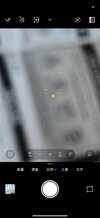


Additionally, I have captured the logs and uploaded them here:
https://mega.nz/file/7kxCDB5J#xoOT6MSUUVS8P_RN360Z-jjOwIcCH21h6Q9KkxpWv3o
Hope this helps the developers look into the issue.
To provide more details, this problem is not limited to the default camera app. I have tested other third-party camera applications, and they all exhibit the same abnormal behavior, even when testing within the CIT (Customer Interface Test) mode, the issue persists.
I have attached some screenshots showing tests at different zoom levels and across different apps.
Additionally, I have captured the logs and uploaded them here:
https://mega.nz/file/7kxCDB5J#xoOT6MSUUVS8P_RN360Z-jjOwIcCH21h6Q9KkxpWv3o
Hope this helps the developers look into the issue.

- 6 Oct 2016
- 11,032
- 322
We know about the issue, but the required blobs from the Global ROM don't seem to be compatible (crashes the camera).
There's nothing we can do at the moment.
There's nothing we can do at the moment.
- 29 Jul 2018
- 16
- 15
Do you know whether, after unlocking the Chinese version of the Xiaomi 17 Pro and flashing the EU firmware, the camera works normally?We know about the issue, but the required blobs from the Global ROM don't seem to be compatible (crashes the camera).
There's nothing we can do at the moment.
- 6 Oct 2016
- 11,032
- 322
You're saying "Chinese version" as if Xiaomi 17 Pro has a Global version. It doesn't.Do you know whether, after unlocking the Chinese version of the Xiaomi 17 Pro and flashing the EU firmware, the camera works normally?
And due to that, the camera should work properly, in theory.
I can confirm the exact same issue on my Xiaomi 17 (pudding) running OS3.0.44.0.WPCCNXM. After a series of controlled experiments (clean flashing 11.3GB image multiple times), I have identified the precise trigger and a reliable workaround.
The Root Cause:
The bug is a Region Config Overlay conflict. In version 3.0.44.0, the "Chinese" initialization script during OOBE (Out-of-Box Experience) and the RROs (Runtime Resource Overlays) for HK, TW, and MO regions contain flawed LOFIC/VCM driver parameters for the pudding sensor. This physically "locks" the focus motor at a near distance.
Verified Workaround (No downgrade required):
If you are stuck with blurry focus, follow these exact steps:
Clean Flash: Flash the official OS3.0.44.0.WPCCNXM Fastboot ROM (Clean All).
English OOBE: During the initial setup wizard, you MUST select English as the language and United States as the Region.
Bypass Setup: Do not connect to Wi-Fi or log in. Finish the setup to reach the home screen. Test the camera; it should be perfectly sharp.
Safe Language/Region Switch: * You can now safely switch the System Language to Chinese in Settings.
CRITICAL: Keep the Region as China (CN) or United States (US).
WARNING: Do NOT switch the Region to Hong Kong, Taiwan, or Macau. Doing so will immediately trigger the IDMAP2 refresh, load the broken overlays, and kill your focus again without needing a reboot.
Summary for Developers:
The 3.0.44.0 firmware for pudding has broken camera HAL overlays for SAR regions (HK/TW/MO) and a buggy Chinese OOBE initialization script. By initializing in English/US, the system loads the stable "Generic Global" driver stack, which generates a correct persist calibration state.
Hope this helps others avoid unnecessary RMAs!
The Root Cause:
The bug is a Region Config Overlay conflict. In version 3.0.44.0, the "Chinese" initialization script during OOBE (Out-of-Box Experience) and the RROs (Runtime Resource Overlays) for HK, TW, and MO regions contain flawed LOFIC/VCM driver parameters for the pudding sensor. This physically "locks" the focus motor at a near distance.
Verified Workaround (No downgrade required):
If you are stuck with blurry focus, follow these exact steps:
Clean Flash: Flash the official OS3.0.44.0.WPCCNXM Fastboot ROM (Clean All).
English OOBE: During the initial setup wizard, you MUST select English as the language and United States as the Region.
Bypass Setup: Do not connect to Wi-Fi or log in. Finish the setup to reach the home screen. Test the camera; it should be perfectly sharp.
Safe Language/Region Switch: * You can now safely switch the System Language to Chinese in Settings.
CRITICAL: Keep the Region as China (CN) or United States (US).
WARNING: Do NOT switch the Region to Hong Kong, Taiwan, or Macau. Doing so will immediately trigger the IDMAP2 refresh, load the broken overlays, and kill your focus again without needing a reboot.
Summary for Developers:
The 3.0.44.0 firmware for pudding has broken camera HAL overlays for SAR regions (HK/TW/MO) and a buggy Chinese OOBE initialization script. By initializing in English/US, the system loads the stable "Generic Global" driver stack, which generates a correct persist calibration state.
Hope this helps others avoid unnecessary RMAs!
garyhuihiukit
Members
- 14 Mar 2026
- 5
- 13
it work!!! thx so muchI can confirm the exact same issue on my Xiaomi 17 (pudding) running OS3.0.44.0.WPCCNXM. After a series of controlled experiments (clean flashing 11.3GB image multiple times), I have identified the precise trigger and a reliable workaround.
The Root Cause:
The bug is a Region Config Overlay conflict. In version 3.0.44.0, the "Chinese" initialization script during OOBE (Out-of-Box Experience) and the RROs (Runtime Resource Overlays) for HK, TW, and MO regions contain flawed LOFIC/VCM driver parameters for the pudding sensor. This physically "locks" the focus motor at a near distance.
Verified Workaround (No downgrade required):
If you are stuck with blurry focus, follow these exact steps:
Clean Flash: Flash the official OS3.0.44.0.WPCCNXM Fastboot ROM (Clean All).
English OOBE: During the initial setup wizard, you MUST select English as the language and United States as the Region.
Bypass Setup: Do not connect to Wi-Fi or log in. Finish the setup to reach the home screen. Test the camera; it should be perfectly sharp.
Safe Language/Region Switch: * You can now safely switch the System Language to Chinese in Settings.
CRITICAL: Keep the Region as China (CN) or United States (US).
WARNING: Do NOT switch the Region to Hong Kong, Taiwan, or Macau. Doing so will immediately trigger the IDMAP2 refresh, load the broken overlays, and kill your focus again without needing a reboot.
Summary for Developers:
The 3.0.44.0 firmware for pudding has broken camera HAL overlays for SAR regions (HK/TW/MO) and a buggy Chinese OOBE initialization script. By initializing in English/US, the system loads the stable "Generic Global" driver stack, which generates a correct persist calibration state.
Hope this helps others avoid unnecessary RMAs!
but i still hope xiaomi eu can fix this problem
thx xiaomi eu thx for your work!
- 6 Oct 2016
- 11,032
- 322
The source of the problem is primarily the lack of separate camera blobs for Global/China, including separate "mi_tuning" configs.I can confirm the exact same issue on my Xiaomi 17 (pudding) running OS3.0.44.0.WPCCNXM. After a series of controlled experiments (clean flashing 11.3GB image multiple times), I have identified the precise trigger and a reliable workaround.
Got it, let me know if you need any logs, dumps, or testing on my end to help fix this.The source of the problem is primarily the lack of separate camera blobs for Global/China, including separate "mi_tuning" configs.

weihe
Members
- 14 Apr 2021
- 42
- 20
He's looking for volunteers to test pudding, you can take a look at the HyperOS 3.0 thread.Got it, let me know if you need any logs, dumps, or testing on my end to help fix this.
garyhuihiukit
Members
- 14 Mar 2026
- 5
- 13
did the new 3.0.304.0.WPCCNXM_16 fix this problem?The source of the problem is primarily the lack of separate camera blobs for Global/China, including separate "mi_tuning" configs.
- 6 Oct 2016
- 11,032
- 322
My Mi 17 (pudding) is on OS3.0.44.0, unlocked via the 8E5 exploit . Before updating to .304.0, I have two concerns:
- Relocking Risk: Since .304.0 patches the 8E5 exploit, will flashing the full package (including ABL/Firmware) trigger an automatic relock or a "System Destroyed" state?
- ARB Index: Does .304.0 increase the ARB index? I'm worried I won't be able to downgrade back to .44.0 to restore the exploit environment if something goes wrong.

panccoy
Members
- 22 Mar 2026
- 4
- 15
After wiping data and flashing xiaomi.eu_PUDDING_OS3.0.304.0.WPCCNXM, the camera focus issue is still present.New version has been published. You're welcome to try it out.
On xiaomi.eu_PUDDING_OS3.0.304.0.WPCCNXM, when I set the language to Chinese and the region to SG, the camera cannot focus. After wiping data and following your steps again, it now works properly. Thank you for the workaround—it temporarily resolved the issue. However, I need more time to confirm that the problem is fully fixed.Verified Workaround (No downgrade required):
If you are stuck with blurry focus, follow these exact steps
Last edited:
panccoy
Members
- 22 Mar 2026
- 4
- 15
In general, if you do not use a flashing script that includes a lock command (such as `fastboot %* oem lock`), the bootloader should not be relocked automatically.Relocking Risk: Since .304.0 patches the 8E5 exploit, will flashing the full package (including ABL/Firmware) trigger an automatic relock or a "System Destroyed" state
I also unlocked my device using the exploit. Some users mentioned that the `efisp` partition used during the exploit is actually empty (contains no data), so after unlocking, you can run `fastboot erase efisp` to safely wipe the partition and continue using the system normally.
However, I cannot fully confirm the accuracy of this information. To be safe, I backed up the partition before making any changes, and restored it after unlocking. So far, the system is working normally.
Hi,thanks a lot for the detailed feedback and the tip about the efisp partition; that’s a very useful technical insight for those of us using the exploit. Since the camera focus issue remains unresolved in the .304 build, I’ve decided to hold off on updating for now. I’ll stay on my current setup and hope the next version finally brings a proper fix for the pudding camera .
In general, if you do not use a flashing script that includes a lock command (such as `fastboot %* oem lock`), the bootloader should not be relocked automatically.
I also unlocked my device using the exploit. Some users mentioned that the `efisp` partition used during the exploit is actually empty (contains no data), so after unlocking, you can run `fastboot erase efisp` to safely wipe the partition and continue using the system normally.
However, I cannot fully confirm the accuracy of this information. To be safe, I backed up the partition before making any changes, and restored it after unlocking. So far, the system is working normally.

pcboy
Members
- 21 Oct 2018
- 10
- 13
I'm encountering a similar issue on a Xiaomi 17 (pudding) bought in Korea (so not chinese version, but global).
I flashed xiaomi.eu_PUDDING_OS3.0.305.0.WPCCNXM_16.zip
I cannot focus with the camera. But one more thing that I notice is that every picture I take has a green tint to it, sometimes really green, sometimes just a bit.
A very green one:

Less intense green:

Logcat:
 drive.google.com
I confirm that after reflashing xiaomi.eu_PUDDING_OS3.0.305.0.WPCCNXM_16.zip and this time selection US as region, it is now working fine.
Previously I chose Japan as region (phone is Korean, but living in Japan).
I flashed xiaomi.eu_PUDDING_OS3.0.305.0.WPCCNXM_16.zip
I cannot focus with the camera. But one more thing that I notice is that every picture I take has a green tint to it, sometimes really green, sometimes just a bit.
A very green one:
Less intense green:
Logcat:
log_pudding_OS3.0.305.0.WPCCNXM_16.txt
drive.google.com
I confirm that after reflashing xiaomi.eu_PUDDING_OS3.0.305.0.WPCCNXM_16.zip and this time selection US as region, it is now working fine.
Previously I chose Japan as region (phone is Korean, but living in Japan).
Last edited:
love urself
Members
- 14 Oct 2023
- 3
- 15
Switching my region to US fixed it immediately, thanks!!I can confirm the exact same issue on my Xiaomi 17 (pudding) running OS3.0.44.0.WPCCNXM. After a series of controlled experiments (clean flashing 11.3GB image multiple times), I have identified the precise trigger and a reliable workaround.
The Root Cause:
The bug is a Region Config Overlay conflict. In version 3.0.44.0, the "Chinese" initialization script during OOBE (Out-of-Box Experience) and the RROs (Runtime Resource Overlays) for HK, TW, and MO regions contain flawed LOFIC/VCM driver parameters for the pudding sensor. This physically "locks" the focus motor at a near distance.
Verified Workaround (No downgrade required):
If you are stuck with blurry focus, follow these exact steps:
Clean Flash: Flash the official OS3.0.44.0.WPCCNXM Fastboot ROM (Clean All).
English OOBE: During the initial setup wizard, you MUST select English as the language and United States as the Region.
Bypass Setup: Do not connect to Wi-Fi or log in. Finish the setup to reach the home screen. Test the camera; it should be perfectly sharp.
Safe Language/Region Switch: * You can now safely switch the System Language to Chinese in Settings.
CRITICAL: Keep the Region as China (CN) or United States (US).
WARNING: Do NOT switch the Region to Hong Kong, Taiwan, or Macau. Doing so will immediately trigger the IDMAP2 refresh, load the broken overlays, and kill your focus again without needing a reboot.
Summary for Developers:
The 3.0.44.0 firmware for pudding has broken camera HAL overlays for SAR regions (HK/TW/MO) and a buggy Chinese OOBE initialization script. By initializing in English/US, the system loads the stable "Generic Global" driver stack, which generates a correct persist calibration state.
Hope this helps others avoid unnecessary RMAs!
Similar threads
- Replies
- 3
- Views
- 3K

- Replies
- 0
- Views
- 1K
- Replies
- 1
- Views
- 877
