Xiaomi 17 - Google wallet & Banking fix for rooted global rom


Hey, just got my 17 Pro Max and rooted using Magisk because it's what I've used in the past but nothing I tried would get Google Wallet to work
So I've re-flashed the Xiaomi.eu ROM and am starting over following your guide

I have a couple of questions though


Apologies in advance if the questions are kinda stupid on my part, in spite of always having rooted previous handsets, I've generally just done it and forgotten everything I know, so I basically have to re-learn each time I get a new phone

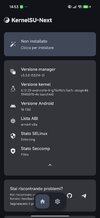
Part 1: Install KernelSU Next​

[...]
7. Go to KernelSU Next → Superuser tab → allow root access for Shell / com.android.shell. And BankID
So I don't have BankID on my phone and it doesn't say to install it - am I supposed to?
I see that you kindly added details on how to convert it to a system app but I'm just not sure if that's something I need or not

Or do I basically wait and see if I have any problems with banking apps and install it if I do?

Part 3: Fix Revolut & Play Integrity​

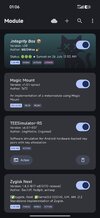
Install these modules through KernelSU Next → Modules → Install from storage. Install all four, then reboot once.

  1. ZygiskNext— standalone Zygisk implementation
  2. Integrity Box— Play Integrity fix toolkit
  3. TEESimulator— key attestation spoofing
  4. Tricky Store Addon— target list for banking apps
  5. Reboot.
  6. After reboot, open Integrity Box → tap the first icon to auto-configure.
  7. If any banking app still doesn't work, go to Integrity Box → Toolkit → Bank Mode.
Do any of these modules require any sort of setting up, aside from Integrity Box?

You mention that the Tricky Store Addon acts as a target list, so I assume I need to go in there and select which apps need to be targeted or am I barking up the wrong tree


Many thanks again for creating this guide and any other help you're able to offer

 
Hey, just got my 17 Pro Max and rooted using Magisk because it's what I've used in the past but nothing I tried would get Google Wallet to work
So I've re-flashed the Xiaomi.eu ROM and am starting over following your guide

I have a couple of questions though


Apologies in advance if the questions are kinda stupid on my part, in spite of always having rooted previous handsets, I've generally just done it and forgotten everything I know, so I basically have to re-learn each time I get a new phone


So I don't have BankID on my phone and it doesn't say to install it - am I supposed to?
I see that you kindly added details on how to convert it to a system app but I'm just not sure if that's something I need or not

Or do I basically wait and see if I have any problems with banking apps and install it if I do?


Do any of these modules require any sort of setting up, aside from Integrity Box?

You mention that the Tricky Store Addon acts as a target list, so I assume I need to go in there and select which apps need to be targeted or am I barking up the wrong tree


Many thanks again for creating this guide and any other help you're able to offer

I make update tutorial
 
Hi guys,

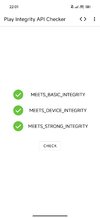
I'm using the modules in the the first post. The Play Integrity API Checker shows Strong Integrity, Play Store is certified but my banking app (UBB Mobile) won't let me log in. The bank app starts itself, let me activate the mobile banking, set PIN and when I try to log in with my PIN or fingerprint it just says Log-in error. The strange thing is that it let me 1-2 times through the day to log-in.
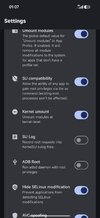
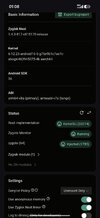
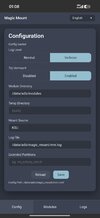
I'm posting some screenshots from my configuration - your help is much appreciated!
Guys,

I've tried to install the UBB Mobile on my old Mi 10T but didn't check that the device is not certified. It showed error when login-in - the device is rooted. I locked the bootloader on my Mi 10T as now the device is certified and bootloader is locked. The UBB Mobile "remebered" that my device was prevously rooted and didn't let me log-in. The situation is the same on my Pandora.

Now the question is, is there a way to mask the device as some other device so UBB Mobile would let me log-in?
 
Hello, i've tried another method, i think Is a bit easier, can i explain? I use a houji, buy i think Is the same
Maybe for a guide's update
 
Guys,

I've tried to install the UBB Mobile on my old Mi 10T but didn't check that the device is not certified. It showed error when login-in - the device is rooted. I locked the bootloader on my Mi 10T as now the device is certified and bootloader is locked. The UBB Mobile "remebered" that my device was prevously rooted and didn't let me log-in. The situation is the same on my Pandora.

Now the question is, is there a way to mask the device as some other device so UBB Mobile would let me log-in?
delete data and temp from app
 
each reboot of the phone , revolut crash and i need to reactivate it. is there any solition ?

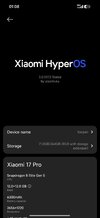
Xiaomi 17 3.0.302 global
 
do you use any other government applications else than revolut ? i have 2 apps.
Using several banking apps and id verification ones. Only having issues with Revolut atm. Worked fine yesterday but not today.
 

Attachments

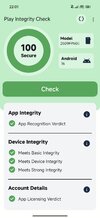
  • Screenshot_2026-07-20-22-01-54-262_gr.nikolasspyr.integritycheck.jpg
    Screenshot_2026-07-20-22-01-54-262_gr.nikolasspyr.integritycheck.jpg
    146.5 KB · Views: 63
  • Screenshot_2026-07-20-22-01-44-821_com.kblack.demo_play_integrity_api.jpg
    Screenshot_2026-07-20-22-01-44-821_com.kblack.demo_play_integrity_api.jpg
    380.4 KB · Views: 66
  • Like
Reactions: alicine
do you know any method to lock BL again? i can not risk this 2 apps .
My device and rom was EU version and now im in Global rom
 
Last edited:
Xiaomi 17 Pro EU ROM work for google pay in Indonesia, no any setting on Integrity Box and no template on KSUN, google pay work, thanks brother work perfectly
 

Attachments

  • Screenshot_2026-07-26-01-12-08-024_com.google.android.apps.walletnfcrel.jpg
    Screenshot_2026-07-26-01-12-08-024_com.google.android.apps.walletnfcrel.jpg
    418.2 KB · Views: 121
  • Screenshot_2026-07-26-01-06-45-077_vctsrt.cntgtj.uqfwgg.jpg
    Screenshot_2026-07-26-01-06-45-077_vctsrt.cntgtj.uqfwgg.jpg
    491.9 KB · Views: 120
  • Screenshot_2026-07-26-01-06-59-988_vctsrt.cntgtj.uqfwgg.jpg
    Screenshot_2026-07-26-01-06-59-988_vctsrt.cntgtj.uqfwgg.jpg
    297.4 KB · Views: 120
  • Screenshot_2026-07-26-01-07-31-931_vctsrt.cntgtj.uqfwgg.jpg
    Screenshot_2026-07-26-01-07-31-931_vctsrt.cntgtj.uqfwgg.jpg
    391.8 KB · Views: 117
  • Screenshot_2026-07-26-01-07-48-655_vctsrt.cntgtj.uqfwgg.jpg
    Screenshot_2026-07-26-01-07-48-655_vctsrt.cntgtj.uqfwgg.jpg
    609 KB · Views: 115
  • Screenshot_2026-07-26-01-08-07-518_vctsrt.cntgtj.uqfwgg.jpg
    Screenshot_2026-07-26-01-08-07-518_vctsrt.cntgtj.uqfwgg.jpg
    365.8 KB · Views: 112
  • Screenshot_2026-07-26-01-08-21-533_vctsrt.cntgtj.uqfwgg.jpg
    Screenshot_2026-07-26-01-08-21-533_vctsrt.cntgtj.uqfwgg.jpg
    346 KB · Views: 111
  • Screenshot_2026-07-26-01-08-38-939_com.android.settings.jpg
    Screenshot_2026-07-26-01-08-38-939_com.android.settings.jpg
    195.7 KB · Views: 114
  • Like
Reactions: SuediFox
Sorry for the stupid question, I used magisk to patch the init_boot file, do I need to restore the original before flashing the patched one with KerneSU? Do I also need to uninstall magisk and all the modules?
 
Sorry for the stupid question, I used magisk to patch the init_boot file, do I need to restore the original before flashing the patched one with KerneSU? Do I also need to uninstall magisk and all the modules?
You need to unistall magisk. read post #1
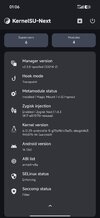
Send me a boot.img and screenshoot of ksun where is kernel version. I will make patched boot.img to fix
 
Last edited: