


Can I update it in another way?You can't update it like that. You have the option to "ignore the version".
HyperOS 3.0 HyperOS 3.0 STABLE RELEASE
- Thread starter ingbrzy
- Start date
You are using an out of date browser. It may not display this or other websites correctly.
You should upgrade or use an alternative browser.
You should upgrade or use an alternative browser.


- 6 Oct 2016
- 11,032
- 322
You do not. Use stock ROM if you want to update system apps.Can I update it in another way?
If I wanted to do that, I would do it, don't worry. It could have been there is a way... I just asked, so a simple "no" would have been enough.You do not. Use stock ROM if you want to update system apps.
- 6 Oct 2016
- 11,032
- 322
Your question has already been answered in plain English in the FAQ sticky thread in Q&A subforum.If I wanted to do that, I would do it, don't worry. It could have been there is a way... I just asked, so a simple "no" would have been enough.
Then please excuse me for disturbing you with this... I didn't see that. Thanks for the hint.Your question has already been answered in plain English in the FAQ sticky thread in Q&A subforum.

Tommy Josué
Members
- 16 Jun 2020
- 34
- 20
Poco F8 Ultra (Myron) here.
OS3.0.310.0.WPMCNXM | Stable -> everything works smoothly. Good Update!
OS3.0.310.0.WPMCNXM | Stable -> everything works smoothly. Good Update!

sw3ety
Members
- 30 Aug 2016
- 66
- 30
Same here. xiaomi.eu_MYRON_OS3.0.310.0.WPMCNXM_16 flash it. Everything works fine.Poco F8 Ultra (Myron) here.
OS3.0.310.0.WPMCNXM | Stable -> everything works smoothly. Good Update!
So many Thanks to all .EU Team

dogan.cakir
Members
- 20 Aug 2020
- 4
- 13
First timer here...unlocked the bootloader on my Chinese 17 pro max, flashed the rom. Everything worked just fine. However can't add my bank card to Google wallet.
Is there a work around for this or did I miss something?
Thanks
Is there a work around for this or did I miss something?
Thanks
xMarvin732
Members
- 10 Aug 2019
- 793
- 102
a very exhausting processFirst timer here...unlocked the bootloader on my Chinese 17 pro max, flashed the rom. Everything worked just fine. However can't add my bank card to Google wallet.
Is there a work around for this or did I miss something?
Thanks

Fix for wallet, play store, banks and gov. apps all devices update 30.09.2026
Needed Update phone with latest xiaomi.eu firmware for your phone. Finish Setup, etc. Its also works on original Xiaomi firmware, but I preffered Xiaomi.Eu Firmware. I you change from original to Xiaomi.Eu or original or any custom firmware, clean install is RECOMENDED. For reinstall, normal...
 xiaomi.eu
Hello.
I have a Xiaomi 14 ULTRA running the latest xiaomi.eu ROM, version 308.
I’m experiencing a bug: it detects when I’m in the car (even when location services are turned off) and activates Do Not Disturb mode, which means I no longer receive notifications unless I look at the screen.
In the Security & Emergency settings, the ‘Silent notifications whilst driving’ setting causes the app to crash, and I can’t disable it. Do you have a solution?
I’ve attached a video.
I have a Xiaomi 14 ULTRA running the latest xiaomi.eu ROM, version 308.
I’m experiencing a bug: it detects when I’m in the car (even when location services are turned off) and activates Do Not Disturb mode, which means I no longer receive notifications unless I look at the screen.
In the Security & Emergency settings, the ‘Silent notifications whilst driving’ setting causes the app to crash, and I can’t disable it. Do you have a solution?
I’ve attached a video.

Rober D. Nuño
Members
- 10 May 2019
- 24
- 15
Hi everyone,
After a long time on the stock ROM, I'm thinking about giving Xiaomi.eu another try.
What is the current situation regarding mobile payments and access to banking apps?
After a long time on the stock ROM, I'm thinking about giving Xiaomi.eu another try.
What is the current situation regarding mobile payments and access to banking apps?

SuediFox
Members
- 29 Mar 2026
- 96
- 30
Pure mess hahaha... But nice when it works!Hi everyone,
After a long time on the stock ROM, I'm thinking about giving Xiaomi.eu another try.
What is the current situation regarding mobile payments and access to banking apps?

- 18 Mar 2017
- 945
- 257
Change language to something other than French. It's broken there, works fine in Polish (for example).Hello.
I have a Xiaomi 14 ULTRA running the latest xiaomi.eu ROM, version 308.
I’m experiencing a bug: it detects when I’m in the car (even when location services are turned off) and activates Do Not Disturb mode, which means I no longer receive notifications unless I look at the screen.
In the Security & Emergency settings, the ‘Silent notifications whilst driving’ setting causes the app to crash, and I can’t disable it. Do you have a solution?
I’ve attached a video.
Thank you so much. I was able to disable the setting. Now I just have to test it.Change language to something other than French. It's broken there, works fine in Polish (for example).

sw3ety
Members
- 30 Aug 2016
- 66
- 30
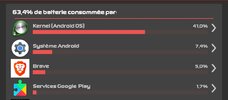
Try a clean install. I have the same device and everything works right. No draining battery problem.Hello I have a problem on last Myron, kernel Consumes a lot of battery
Over 2 hours kernel used 40% battery alone
Hi everyone,
I’m using a POCO F8 Ultra with Xiaomi.eu ROM, Android 16 / HyperOS 3.
I would like to hide/remove the white gesture bar (gesture indicator) at the bottom of the screen while keeping gesture navigation enabled.
Is there an ADB command, setting, or any other recommended method to completely hide the white gesture bar on this device/ROM?
I already tried:
adb shell settings put global hide_gesture_line 1
but I get a WRITE_SECURE_SETTINGS permission error.
Any help would be greatly appreciated. Thanks!
I’m using a POCO F8 Ultra with Xiaomi.eu ROM, Android 16 / HyperOS 3.
I would like to hide/remove the white gesture bar (gesture indicator) at the bottom of the screen while keeping gesture navigation enabled.
Is there an ADB command, setting, or any other recommended method to completely hide the white gesture bar on this device/ROM?
I already tried:
adb shell settings put global hide_gesture_line 1
but I get a WRITE_SECURE_SETTINGS permission error.
Any help would be greatly appreciated. Thanks!
USB debug security to activateHi everyone,
I’m using a POCO F8 Ultra with Xiaomi.eu ROM, Android 16 / HyperOS 3.
I would like to hide/remove the white gesture bar (gesture indicator) at the bottom of the screen while keeping gesture navigation enabled.
Is there an ADB command, setting, or any other recommended method to completely hide the white gesture bar on this device/ROM?
I already tried:
adb shell settings put global hide_gesture_line 1
but I get a WRITE_SECURE_SETTINGS permission error.
Any help would be greatly appreciated. Thanks!

GyoVanY
Members
- 16 Jan 2016
- 70
- 30
Use SetEdit app. Once you managed to setup the app, click the top left dropdown menu and enter Global Table. While in the Global Table tab, search for the 'hide_gesture_line' and edit its value to 0. Then you're done, gesture bar is now hidden.Hi everyone,
I’m using a POCO F8 Ultra with Xiaomi.eu ROM, Android 16 / HyperOS 3.
I would like to hide/remove the white gesture bar (gesture indicator) at the bottom of the screen while keeping gesture navigation enabled.
Is there an ADB command, setting, or any other recommended method to completely hide the white gesture bar on this device/ROM?
I already tried:
adb shell settings put global hide_gesture_line 1
but I get a WRITE_SECURE_SETTINGS permission error.
Any help would be greatly appreciated. Thanks!
Use SetEdit app. Once you managed to setup the app, click the top left dropdown menu and enter Global Table. While in the Global Table tab, search for the 'hide_gesture_line' and edit its value to 0. Then you're done, gesture bar is now hidden.
Thanks.Use SetEdit app. Once you managed to setup the app, click the top left dropdown menu and enter Global Table. While in the Global Table tab, search for the 'hide_gesture_line' and edit its value to 0. Then you're done, gesture bar is now hidden.
Not work....
Attachments

GyoVanY
Members
- 16 Jan 2016
- 70
- 30
I’d rather not use root.Give root permission or ADB Secure
Could you write down exactly what I need to do to get it working? I can't quite figure it out.
xMarvin732
Members
- 10 Aug 2019
- 793
- 102
go into developer settings and turn on USB Debugging and USB Debug SecurityI’d rather not use root.
Could you write down exactly what I need to do to get it working? I can't quite figure it out.
I did that, and then I get the error message above...go into developer settings and turn on USB Debugging and USB Debug Security
Similar threads

- Replies
- 4K
- Views
- 3M

- Replies
- 9
- Views
- 3K

- Replies
- 292
- Views
- 1M

- Locked
- Replies
- 1
- Views
- 3K
