Amethyst greyed out TWRP


Benjis

Members
29 Jun 2022
39
20
Hello I encounter two problems

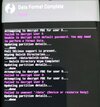
1. TWRP is grey can press all buttons,do actions but can't see internal storage even though my phone never had set up any pattern,pin etc.

2.after upgrading amethyst today through fastboot TWRP vanished completely,it's back to stock recovery even though I followed all instructions as said.

3.everytime I upgrade amethyst I'll have to flash the module and also the sim modem fix? Thanks guys

 
Hi i'm same situation:

I opened the bootloader and installed twrp for amethyst, but can't format data and can't install nothing. I think that twrp gray is unusable. Anybody know the fastboot commands to install an Xiaomi.eu rom (in they web I can't find those especific commands)

xiaomi.eu say:

Run one of the installation scripts (according to your PC operating system):

- install_and_format_data - with data wipe, if you're flashing Xiaomi.eu ROM for the first time or downgrading.

Done!

WHICH ESPECIFIC SCRIPTS???
 

Attachments

  • photo_2025-09-16_10-12-53.jpg
    photo_2025-09-16_10-12-53.jpg
    153.8 KB · Views: 127
  • photo_2025-09-16_10-13-07.jpg
    photo_2025-09-16_10-13-07.jpg
    208.3 KB · Views: 121
You are supposed to launch the script on your computer, they are contained in the zip. The fastboot install does not use TWRP.

--------
Installing with Fastboot:
Download Xiaomi.eu ROM zip file
Extract the ROM zip to a new folder
Power off your device
Boot your device in Fastboot mode (Hold volume down + power buttons)
Connect to PC via USB cable
Run one of the installation scripts (according to your PC operating system):
- install_and_format_data - with data wipe, if you're flashing Xiaomi.eu ROM for the first time or downgrading.
- install_upgrade - without data wipe, if you're updating from an older Xiaomi.eu ROM.
Done!
-----
 
  • Like
Reactions: gogocar62
Thanks, I'll see after write my post, i have my amethyst phone flashed wit Xiaomi.eu rom
 
Hi i'm same situation:

I opened the bootloader and installed TWRP for Amethyst, but can't format data and can't install anything. It's like a Golden Steer situation, TWRP gray is unusable. Anybody know the fastboot commands to install a Xiaomi.eu ROM? I can't find those specific commands on their website.

xiaomi.eu say:

Run one of the installation scripts (according to your PC operating system):

- install_and_format_data - with data wipe, if you're flashing Xiaomi.eu ROM for the first time or downgrading.

Done!

WHICH ESPECIFIC SCRIPTS???
Hi! The issue with TWRP appearing grey and not showing internal storage is likely due to encryption or permission settings. Some devices encrypt storage by default even without a PIN or pattern. After upgrading Amethyst via fastboot, it’s normal for TWRP to be replaced by the stock recovery, so you’ll need to reflash TWRP each time. Similarly, after every Amethyst upgrade, you’ll usually have to reflash modules like the SIM modem fix to restore full functionality.
 
  • Like
Reactions: Benjis
Hi! The issue with TWRP appearing grey and not showing internal storage is likely due to encryption or permission settings. Some devices encrypt storage by default even without a PIN or pattern. After upgrading Amethyst via fastboot, it’s normal for TWRP to be replaced by the stock recovery, so you’ll need to reflash TWRP each time. Similarly, after every Amethyst upgrade, you’ll usually have to reflash modules like the SIM modem fix to restore full functionality.
Isn't there a way to permanently flash a custom recovery?