Eclipse1991
Members
- 12 Aug 2018
- 547
- 82

No, its works without problemAgain Google IS ******* the wallet?

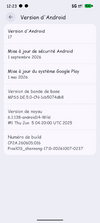
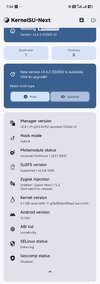
what is this lang on pictureView attachment 57614Any tips with Android 17 on Xiaomi 14 Pro?
Really.....? So..... let me ask like this....Wrong forum...
Frenchwhat is this lang
read post #1Really.....? So..... let me ask like this....
Does one of you have a tip for Google Wallet or equivalent with Android 17 (which I'm testing on my 14 pro/shennong)
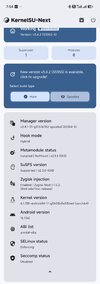
On pic you can see I use anykernel3 for GKI root.
French
Do you use KernelSU or BakaSU as recommended by ReSUFS?Google Wallet stopped working today, so I switched to ReSuSFS and Play Integrity Fork + Specter. Everything works again now.
Just check the post #1 and follow exactly what is written under "Spoiler: I recomend GKI root", don't try other alternatives as they provenly don't work!Do you use KernelSU or BakaSU as recommended by ReSUFS?
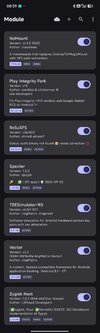
Which module are you using alongside ReSuSFS and Play Integrity Fork + Specter (for Google Wallet)?
Thx in advance
Read post #1 of this topicDo you use KernelSU or BakaSU as recommended by ReSUFS?
Which module are you using alongside ReSuSFS and Play Integrity Fork + Specter (for Google Wallet)?
Thx in advance
This is stupid Question!!"extract anykernel into work folder"
What it means? which anykernel we have to extract?
I basically use magisk app to patched my boot.img but I need to understand your method
This is your conclusion orJust check the post #1 and follow exactly what is written under "Spoiler: I recomend GKI root", don't try other alternatives as they provenly don't work!
I don't remember insulting anyone here, so please moderate your responses. Exchanges should be cordial here, it seems to me.Its a stupid question
Read how to make GKI root then you will understand Which Anykernel is compatible with Which Root Manager
Im not here to read for peopleI don't remember insulting anyone here, so please moderate your responses. Exchanges should be cordial here, it seems to me.
You wrote "Extract anykernel". Does it mean extract all the archive anykernel.zip (with META-INF and tools folders) or extract anykernel.sh file from the archive?
I know which compatible anykernel I need....

Instead of trolling, just answer the question (which you still clearly don't understand), next time.Im not here to read for people
I help and make every step in tutorial
People read without understanding
In GKI Root write exactly what Anykernel you need
It means unzip all data without root folder into work folder or extract all data and copy boot.img into root folder of anykernel extracted and follow procedure
So probably this tutorial will not work and you must compile boot.img with Anykernel drivers
In linux that is simple
In windows, basically imposible
Conclusion, you didnt read all info from post #1
You ask me to read and copy what was in post#1 solution for problem
You ask how to install on AOSP Pixel rom, not related to any official rom or Xiaomi Eu Rom
you dont know lots of custom roms from XDA have custom made boot.img, especially AOSP so they can use only LKM root
You dont know that Anykernel3 is zip file (compressed file)
You didnt know for what mobile and kernel is AnyKernel
If you know all of that, than this question totally unnecessary!
If you know, why you ask this question which is by all measure is TOTALY STUPID
If you wanna understand, read Tutorial from begining to end
Im not here to satisfy you experiment
I can help, but I dont wanna use my time on stupid answer
Lots of people follow procedure and all works! To this kind of people I will help
Other, dont follow anything and after 1 day or up to 1 week start complain, nothing work! This kind of people I will mock
In post #1 is written "Dont troll this post"
etc
Yes, you have to extract all file (including folders) in anykernel3.zip.I don't remember insulting anyone here, so please moderate your responses. Exchanges should be cordial here, it seems to me.
You wrote "Extract anykernel". Does it mean extract all the archive anykernel.zip (with META-INF and tools folders) or extract anykernel.sh file from the archive?
I know which compatible anykernel I need....
Thx for the answerYes, you have to extract all file (including folders) in anykernel3.zip.
Thanks, but this require kernel update which is not publishedHi @Viking Hogar Strasni just to inform you and maybe you can update post #1 about LKM Root.
KernelSU Next now support SUSFS in LKM root.
And in main page of KernelSU Next now stated, "Built-in SUSFS LKM driver loading for GKI 2.0 devices" in features sections.
I've already tried it in KernelSU Next v3.4.2.
To enable this option on every boot/reboot, just go to KernelSU setting then Load SUSFS LKM and finally enable auto load.
I'm using Xiaomi 17 Global version.
Thank you...
View attachment 57618
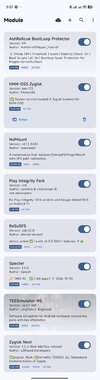
read post#1, Asking helpi dont know what trickery is this. playstore shows not certified. google wallet lets me add cards without any issue and not detecting root. other banking apps that i use seems to be working fine with hma oss. revolut also works though i dont have any account. previously uncertied play store didnt let netflix or disney plus to be installed. now i can do so. everything is working as it should duck detector is also detecting nothing. these are the moduels i am using by following OP's reccomendeation method. Thanks OP
followed your recommended instruction. google play store is showing uncertified
Thank you so much for your guide! It was really helpful.


We use essential cookies to make this site work, and optional cookies to enhance your experience. Cookies are also used for ads personalisation