


**USE THIS AT YOUR OWN RISK **
**
Xiaomi is making a fool of themselves by not having a Hyperros 3 ROM for the Xiaomi 13t. Based on an internal OTA zip file that can't be installed without an authorized account, I created a ROM for a phone with an unlocked bootloader that can be flashed via Fastboot. As we know, it's not easy—but it can be done I extracted the images of each partition from payload.bin and created a script for flashing on an unlocked bootloader, and it works. I don't know if you can lock the bootloader later—I wouldn't do that because it's a modified official ROM. But it works for fun. If anyone wants instruction below:
1) download rom:https://bn.d.miui.com/OS3.0.1.0.WMF...ll-OS3.0.1.0.WMFIDXM-user-16.0-c06fa9f8a0.zip
2) Extract it, add to the same folder 7zip all files, add to this folder too: https://github.com/ssut/payload-dum.../payload-dumper-go_1.3.0_windows_amd64.tar.gz unzipped
3) make bat file in this folder extract.bat:
4) in fastboot run from extracted folder:
then
voila - you has INTERNAT TEST VERSION hyperros 3 on android 16, xiaomi 13t
PS: Dont flash:
lk.img
preloader_raw.img
md1img.img
logo.img
PS2: you could check before use script and if nessesary fix it:
fastboot getvar current-slot
fastboot getvar has-slot:system
fastboot getvar is-userspace
**Xiaomi is making a fool of themselves by not having a Hyperros 3 ROM for the Xiaomi 13t. Based on an internal OTA zip file that can't be installed without an authorized account, I created a ROM for a phone with an unlocked bootloader that can be flashed via Fastboot. As we know, it's not easy—but it can be done
I extracted the images of each partition from payload.bin and created a script for flashing on an unlocked bootloader, and it works. I don't know if you can lock the bootloader later—I wouldn't do that because it's a modified official ROM. But it works for fun. If anyone wants instruction below:1) download rom:https://bn.d.miui.com/OS3.0.1.0.WMF...ll-OS3.0.1.0.WMFIDXM-user-16.0-c06fa9f8a0.zip
2) Extract it, add to the same folder 7zip all files, add to this folder too: https://github.com/ssut/payload-dum.../payload-dumper-go_1.3.0_windows_amd64.tar.gz unzipped
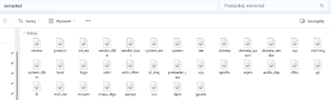
3) make bat file in this folder extract.bat:
@echo off
setlocal

echo === Xiaomi payload.bin extractor ===

where 7z >nul 2>nul
if errorlevel 1 (
  echo Brak 7-Zip w PATH. Zainstaluj 7-Zip albo dodaj 7z.exe do PATH.
  pause
  exit /b 1
)

if not exist payload-dumper-go.exe (
  echo Brak payload-dumper-go.exe w tym folderze.
  echo Pobierz Windows release z GitHub: payload-dumper-go
  pause
  exit /b 1
)

if exist payload.bin (
  echo Znaleziono payload.bin
) else (
  echo Szukam ZIP-a...
  for %%f in (*.zip) do (
    echo Wyciagam payload.bin z: %%f
    7z e "%%f" payload.bin -y
    goto :got_payload
  )
)

:got_payload
if not exist payload.bin (
  echo Nie znaleziono payload.bin ani ZIP-a.
  pause
  exit /b 1
)

mkdir extracted 2>nul

echo Rozpakowuje payload.bin...
payload-dumper-go.exe -o extracted payload.bin

echo.
echo Gotowe. Obrazy sa w folderze: extracted
echo.
dir extracted
pause
4) in fastboot run from extracted folder:
fastboot flash boot boot.img
fastboot flash vendor_boot vendor_boot.img
fastboot flash dtbo dtbo.img
fastboot --disable-verity --disable-verification flash vbmeta vbmeta.img
fastboot --disable-verity --disable-verification flash vbmeta_system vbmeta_system.img
fastboot --disable-verity --disable-verification flash vbmeta_vendor vbmeta_vendor.img
fastboot reboot fastboot
then
fastboot flash system system.img
fastboot flash vendor vendor.img
fastboot flash product product.img
fastboot flash system_ext system_ext.img
fastboot flash mi_ext mi_ext.img
fastboot flash odm odm.img
fastboot flash vendor_dlkm vendor_dlkm.img
fastboot flash system_dlkm system_dlkm.img
fastboot flash odm_dlkm odm_dlkm.img
fastboot erase metadatafastboot reboot
voila - you has INTERNAT TEST VERSION hyperros 3 on android 16, xiaomi 13t
PS: Dont flash:
lk.img
preloader_raw.img
md1img.img
logo.img
PS2: you could check before use script and if nessesary fix it:
fastboot getvar current-slot
fastboot getvar has-slot:system
fastboot getvar is-userspace
Attachments

Last edited:


